Live Demo
Try SeaORM Pro in your browser, without installing anything!
- Visit https://sea-orm-pro-demo.sea-ql.org/admin/
- Login with the following credential
Username: admin@sea-ql.org / manager@sea-ql.org / public@sea-ql.org
Password: demo@sea-ql.org
Try to login with different account, with Role Based Access Control (RBAC), each account have different level of access to the admin panel:
admin@sea-ql.org: Full access to edit RBAC permissions and full CRUD to all tablesmanager@sea-ql.org: Readonly access to RBAC and able to edit all other tablespublic@sea-ql.org: Readonly access to publicly available tables
Run Locally
Clone the source code from GitHub and follow the instruction on README for installation guide:
- SeaORM Pro with full CRUD support, Rust backend and access to the frontend artifact.
- SeaORM Pro Plus provides additional features and access to the frontend source code.
- Role Based Access Control is fully integrated into SeaORM Pro Plus. It offers a GUI editor to edit RBAC permissions and assign user roles.
Database Schema
We use AdventureWorksLT2012 database schema for the demo.
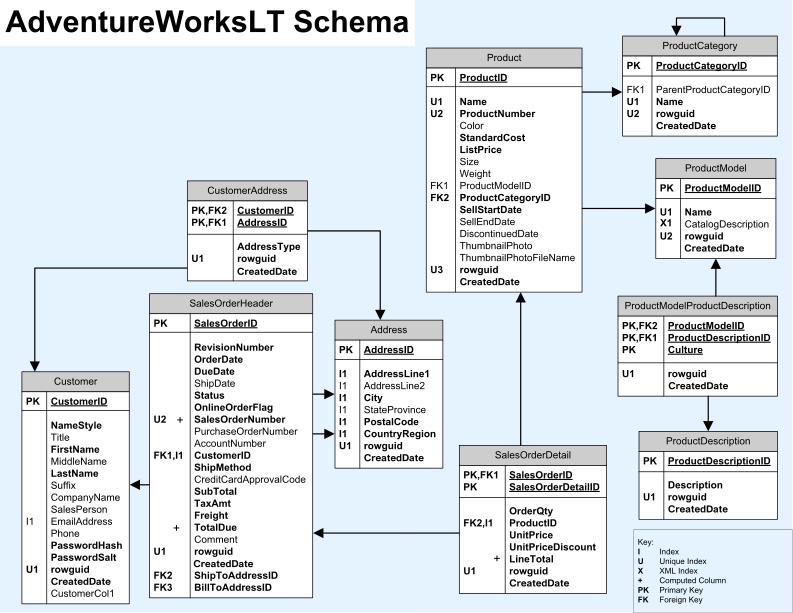
In the following section, we will explain the configuration of admin panel in details with AdventureWorksLT2012 as the sample database.