Getting Started
Here we start from the Seaography Example using a simplified Bakery schema.
There are other examples with more complex schemas:
To get started, all you need is a live SQL database with schema. You can code everything in Rust by writing SeaORM entities, or design the schema with a GUI tool (e.g. DataGrip).
Install Seaography CLI
cargo install seaography-cli@^2.0
Generate Seaography Entities
Dense Entity Format
The exact same, byte-for-byte SeaORM entities can be used in Seaography. The magic happens behind the seaography feature flag of SeaORM's macros.
sea-orm-cli generate entity --output-dir ./src/entities --entity-format dense
//! `SeaORM` Entity, @generated by sea-orm-codegen 2.0.0

use sea_orm::entity::prelude::*;

#[sea_orm::model]
#[derive(Clone, Debug, PartialEq, DeriveEntityModel, Eq)]
#[sea_orm(table_name = "cake")]
pub struct Model {
    #[sea_orm(primary_key)]
    pub id: i32,
    pub name: String,
    #[sea_orm(column_type = "Decimal(Some((16, 4)))")]
    pub price: Decimal,
    pub bakery_id: i32,
    pub gluten_free: bool,
    #[sea_orm(
        belongs_to,
        from = "bakery_id",
        to = "id",
        on_update = "Cascade",
        on_delete = "Cascade"
    )]
    pub bakery: BelongsTo<super::bakery::Entity>,
    #[sea_orm(has_many, via = "cake_baker")]
    pub bakers: HasMany<super::baker::Entity>,
}

impl ActiveModelBehavior for ActiveModel {}
Compact Entity Format
sea-orm-cli generate entity --output-dir ./src/entities --entity-format compact --seaography
Generate entities with sea-orm-cli like you normally do, but with an additional --seaography flag. The entities are basically good-old SeaORM entities, but with an additional RelatedEntity enum.
//! `SeaORM` Entity, @generated by sea-orm-codegen 2.0.0

use sea_orm::entity::prelude::*;

#[derive(Clone, Debug, PartialEq, DeriveEntityModel, Eq)]
#[sea_orm(table_name = "cake")]
pub struct Model {
    #[sea_orm(primary_key)]
    pub id: i32,
    pub name: String,
    #[sea_orm(column_type = "Decimal(Some((16, 4)))")]
    pub price: Decimal,
    pub bakery_id: i32,
    pub gluten_free: bool,
}

#[derive(Copy, Clone, Debug, EnumIter, DeriveRelation)]
pub enum Relation { .. }

impl Related<super::bakery::Entity> for Entity { .. }

impl ActiveModelBehavior for ActiveModel {}

#[derive(Copy, Clone, Debug, EnumIter, DeriveRelatedEntity)]
pub enum RelatedEntity {
    #[sea_orm(entity = "super::bakery::Entity")]
    Bakery,
    #[sea_orm(entity = "super::baker::Entity")]
    Baker,
}
Generate GraphQL Project
Generating a fresh project is the easiest way to launch a GraphQL server. However, Seaography can easily be integrated to an existing web server built with any web framework.
Seaography supports Actix, Axum, and Poem out of the box.
Run the following command:
seaography-cli --output-dir . --entities ./src/entities --framework axum sea-orm-seaography-example
Full help:
🧭 A GraphQL framework for SeaORM

Usage: seaography-cli [OPTIONS] --entities <ENTITIES> --database-url <DATABASE_URL> <CRATE_NAME>

Arguments:
  <CRATE_NAME>  Crate name for generated project

Options:
  -o, --output-dir <OUTPUT_DIR>
          Project output directory [default: ./]
  -e, --entities <ENTITIES>
          Entities directory
  -u, --database-url <DATABASE_URL>
          Database URL [env: DATABASE_URL]
  -f, --framework <FRAMEWORK>
          Which web framework to use [default: poem] [possible values: actix, poem, axum]
      --depth-limit <DEPTH_LIMIT>
          GraphQL depth limit
      --complexity-limit <COMPLEXITY_LIMIT>
          GraphQL complexity limit
  -h, --help
          Print help
  -V, --version
          Print version
Start the server
cd graphql
cargo run
You are of course free to modify the project to suit your needs.
The interesting bit starts at the schema_builder function in query_root.rs.
You can add custom entities, queries and mutations to the GraphQL schema.
Run some queries
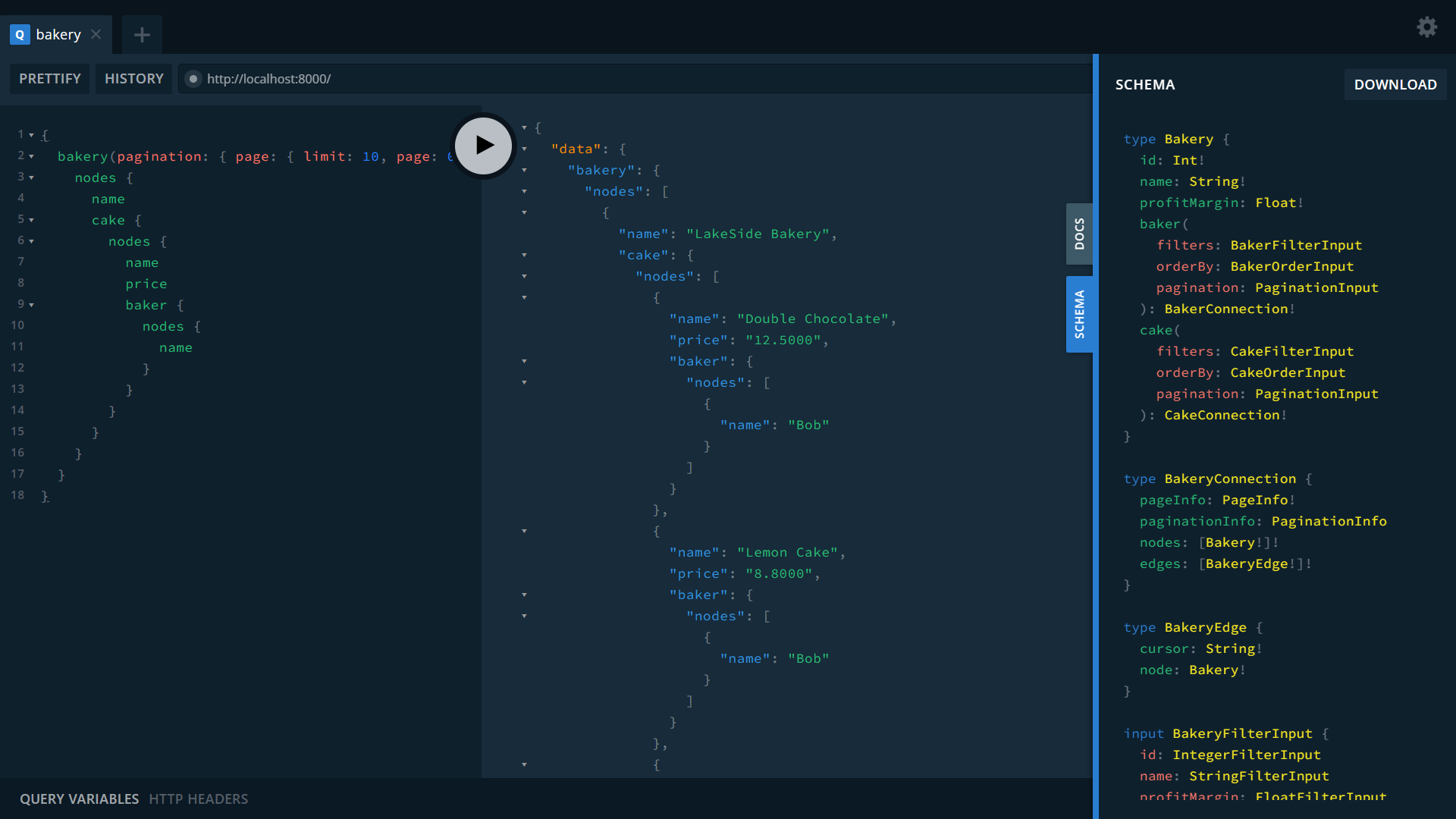
Visit GraphQL Playground at http://localhost:8000
Navigate to the GraphQL Playground, and then start running some queries!
Find chocolate cakes and know where to buy them
{
  cake(filters: { name: { contains: "Chocolate" } }) {
    nodes {
      name
      price
      bakery {
        name
      }
    }
  }
}
Find all cakes baked by Alice
{
  cake(having: { baker: { name: { eq: "Alice" } } }) {
    nodes {
      name
      price
      baker {
        nodes {
          name
        }
      }
    }
  }
}
List all bakeries and their cakes, along with bakers who bakes them
{
  bakery(pagination: { page: { limit: 10, page: 0 } }, orderBy: { name: ASC }) {
    nodes {
      name
      cake {
        nodes {
          name
          price
          baker {
            nodes {
              name
            }
          }
        }
      }
    }
  }
}
Where to go from here
Seaography covers all the needs of building complex applications - from data access, access control to frontend integration.
Learn more about adding custom GraphQL endpoints and customizing resolver in Seaography's Extensive Documentation.