快速入门
我们从使用简化版 Bakery schema 的 Seaography 示例 开始。
还有其他更复杂 schema 的示例:
要开始使用,你只需要一个带有 schema 的可用 SQL 数据库。你可以通过编写 SeaORM 实体在 Rust 中完成所有工作,或使用 GUI 工具(例如 DataGrip)设计 schema。
安装 Seaography CLI
cargo install seaography-cli@^2.0.0-rc
生成 Seaography 实体
Dense Entity 格式
完全相同的、逐字节的 SeaORM 实体可以在 Seaography 中使用。魔法发生在 SeaORM 宏的 seaography feature flag 背后。
sea-orm-cli generate entity --output-dir ./src/entities --entity-format dense
src/entities/cake.rs
//! `SeaORM` Entity, @generated by sea-orm-codegen 2.0.0-rc.14

use sea_orm::entity::prelude::*;

#[sea_orm::model]
#[derive(Clone, Debug, PartialEq, DeriveEntityModel, Eq)]
#[sea_orm(table_name = "cake")]
pub struct Model {
    #[sea_orm(primary_key)]
    pub id: i32,
    pub name: String,
    #[sea_orm(column_type = "Decimal(Some((16, 4)))")]
    pub price: Decimal,
    pub bakery_id: i32,
    pub gluten_free: bool,
    #[sea_orm(
        belongs_to,
        from = "bakery_id",
        to = "id",
        on_update = "Cascade",
        on_delete = "Cascade"
    )]
    pub bakery: HasOne<super::bakery::Entity>,
    #[sea_orm(has_many, via = "cake_baker")]
    pub bakers: HasMany<super::baker::Entity>,
}

impl ActiveModelBehavior for ActiveModel {}
Compact Entity 格式
sea-orm-cli generate entity --output-dir ./src/entities --entity-format compact --seaography
像往常一样使用 sea-orm-cli 生成实体,但需要额外添加 --seaography 标志。这些实体基本上是经典的 SeaORM 实体,但多了一个 RelatedEntity 枚举。
src/entities/cake.rs
//! `SeaORM` Entity, @generated by sea-orm-codegen 2.0.0-rc.12

use sea_orm::entity::prelude::*;

#[derive(Clone, Debug, PartialEq, DeriveEntityModel, Eq)]
#[sea_orm(table_name = "cake")]
pub struct Model {
    #[sea_orm(primary_key)]
    pub id: i32,
    pub name: String,
    #[sea_orm(column_type = "Decimal(Some((16, 4)))")]
    pub price: Decimal,
    pub bakery_id: i32,
    pub gluten_free: bool,
}

#[derive(Copy, Clone, Debug, EnumIter, DeriveRelation)]
pub enum Relation { .. }

impl Related<super::bakery::Entity> for Entity { .. }

impl ActiveModelBehavior for ActiveModel {}

#[derive(Copy, Clone, Debug, EnumIter, DeriveRelatedEntity)]
pub enum RelatedEntity {
    #[sea_orm(entity = "super::bakery::Entity")]
    Bakery,
    #[sea_orm(entity = "super::baker::Entity")]
    Baker,
}
生成 GraphQL 项目
生成新项目是启动 GraphQL 服务器的最简单方式。 然而,Seaography 可以轻松集成到使用任何 Web 框架构建的现有 Web 服务器中。
Seaography 开箱即用支持 Actix、Axum 和 Poem。
运行以下命令:
seaography-cli --output-dir . --entities ./src/entities --framework axum sea-orm-seaography-example
完整帮助:
🧭 A GraphQL framework for SeaORM

Usage: seaography-cli [OPTIONS] --entities <ENTITIES> --database-url <DATABASE_URL> <CRATE_NAME>

Arguments:
  <CRATE_NAME>  Crate name for generated project

Options:
  -o, --output-dir <OUTPUT_DIR>
          Project output directory [default: ./]
  -e, --entities <ENTITIES>
          Entities directory
  -u, --database-url <DATABASE_URL>
          Database URL [env: DATABASE_URL]
  -f, --framework <FRAMEWORK>
          Which web framework to use [default: poem] [possible values: actix, poem, axum]
      --depth-limit <DEPTH_LIMIT>
          GraphQL depth limit
      --complexity-limit <COMPLEXITY_LIMIT>
          GraphQL complexity limit
  -h, --help
          Print help
  -V, --version
          Print version
启动服务器
cd graphql
cargo run
你当然可以自由修改项目以满足你的需求。
有趣的部分从 query_root.rs 中的 schema_builder 函数开始。
你可以向 GraphQL schema 添加自定义实体、查询和变更。
运行一些查询
Visit GraphQL Playground at http://localhost:8000
导航到 GraphQL Playground,然后开始运行一些查询!
查找巧克力蛋糕并知道在哪里购买
{
  cake(filters: { name: { contains: "Chocolate" } }) {
    nodes {
      name
      price
      bakery {
        name
      }
    }
  }
}
查找 Alice 烘焙的所有蛋糕
{
  cake(having: { baker: { name: { eq: "Alice" } } }) {
    nodes {
      name
      price
      baker {
        nodes {
          name
        }
      }
    }
  }
}
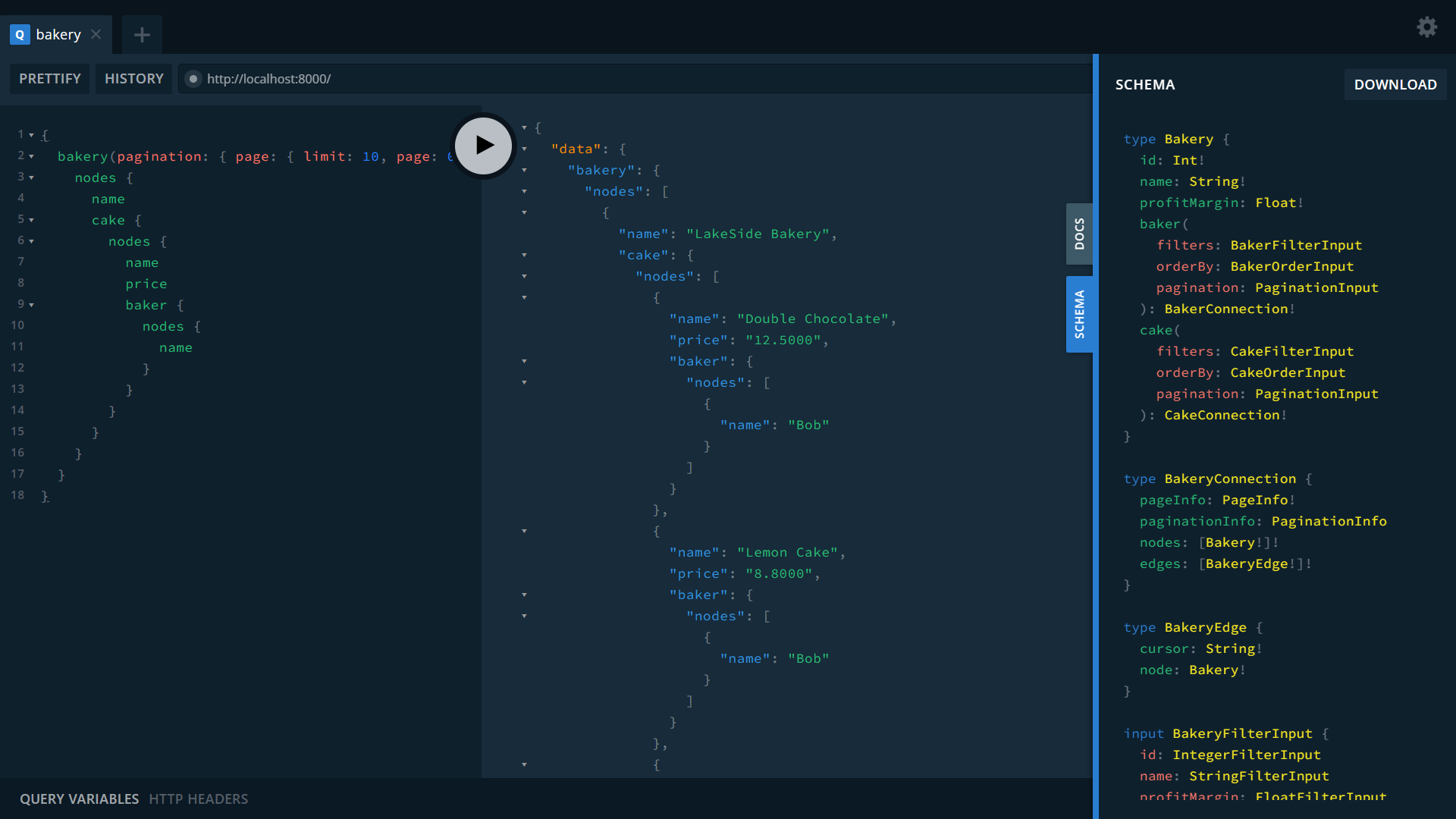
列出所有烘焙店及其蛋糕,以及烘焙它们的面包师
{
  bakery(pagination: { page: { limit: 10, page: 0 } }, orderBy: { name: ASC }) {
    nodes {
      name
      cake {
        nodes {
          name
          price
          baker {
            nodes {
              name
            }
          }
        }
      }
    }
  }
}
下一步
Seaography 涵盖构建复杂应用的所有需求——从数据访问、访问控制到前端集成。
在 Seaography 完整文档 中了解更多关于添加自定义 GraphQL 端点和自定义 resolver 的内容。